
eCertified Online
Prepare, Track and Manage Certified Mail More Efficiently
Save $1.58 each in postage!
eCertifiedonline.com is the simple, secure way to prepare, track and manage your accountable mail that saves time and reduces postage costs.
Fast, Simple Preparation
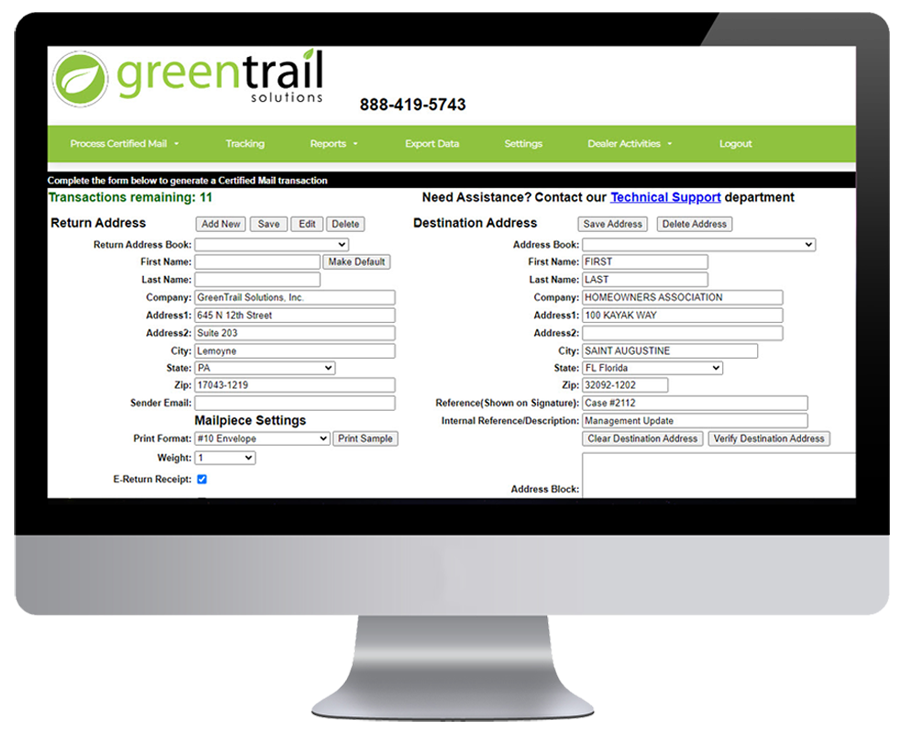
Using the online application, creating a mail piece is fast and simple. Enter the address or select batch print from the address book or file import and press print. It’s that quick and simple.
Flexible Print Options
Print the Certified Mail cover page on plain paper, add your documents and then insert them into the double window Certified Mail envelopes available in #10, 6×9 and 9×12 sizes or print to Certified Mail thermal labels and apply to your envelopes.
Option 1:
Print Address Cover Page with Barcode and Insert into Double Window Certified Mail Envelope
Option 2:
Print Barcode on Certified Mail Thermal Labels
Cloud Based

Secure online access with no software to install
Easy to Use

Quickly and easily create Certified Mail
Manage

Monitor, track and streamline processes
Access

Electronic Return Receipt is stored for 10 years
Save

Save $1.48 using Electronic Return Receipt
Address Validation
Prevent delayed or undeliverable mail by validating addresses prior to mailing, Using USPS CASS address validation, bad addresses or missing information, such as an apartment or suite, can be identified and fixed before mailing. Valid addresses are then standardized and updated with zip+4 optimizing delivery.
Proof of Mailing
Generate and print the USPS Firm Mailing Book, Form-3877 on plain paper.
Simplifying the process, all your mailing information with tracking numbers is automatically filled in, including an optional custom reference field.
Then present your mail with this form at the post office to obtain a dated postmark stamp for legal proof of mailing .
Proof of Delivery
Real-time tracking e-mails are sent each time a Certified Mail letter is delivered.
View the digital signatures via the tracking dashboard within your account.
Download them as one multi- page PDF or as
individual PDF’s per signature.
Create
Processing
- Single Mailpiece
- Batch from Address
- Book Batch from Import File
Address Book
- Sender
- Recipient
Address Validation
- Single Mailpiece Processing
Reference Fields
- Reference/ Docket Number Shown on ERR Internal
- Reference/Description/Docket Number
Envelope and Label Formats
- #10 Envelope
- 6×9 Envelope
- 9×12 Envelope
- Thermal Label
Print Options
- Custom Logo
- Include Reference
Manage
Tracking Dashboard
- Advanced Filters
- Detailed Tracking History
- PDF eReturn Receipt
E-Return Receipt Retrieval
- Single Download
- Bulk Download
- Weekly Signature E-mail
E-mail Notifications
- Delivery Confirmation
- Weekly Delivery Report
Reporting
- Cost Account Report
- USPS Firm Book Form-3877 Export Data
- Envelope and Label Formats
Administration
- Single or Multi-User
- Admin and User Roles Unlimited Users